미루지 말자.
Web Architecture
client는 사용자, 요청하는 프로그램을 말한다. server는 리소스를 가지고 클라이언트에게 응답(service)하는 하드웨어 또는 소프트웨어를 말한다. 클라이언트는 요청하고, 서버는 응답한다.
브라우저는 대표적인 클라이언트다. browser는 URL을 입력해서 서버에 리소스를 요청하고, 서버의 응답을 클라이언트에게 보여주는 사용자 인터페이스(UI) 역할을 한다.
UI는 사용자가 상호작용할 수 있는 인터페이스를 말하고, API는 프로그래밍을 위한 인터페이스를 말한다. 그러니까 API로 UI를 만들 수 있다.
서버와 클라이언트가 요청과 응답을 주고받을 때는 프로토콜을 따른다. HTTP, HTTPS 등이 있다.
HTTP
HTTP is a protocol which allows the fetching of resources, such as HTML documents. It is the foundation of any data exchange on the Web and it is a client-server protocol, which means requests are initiated by the recipient, usually the Web browser.
Clients and servers communicate by exchanging individual messages (as opposed to a stream of data). The messages sent by the client, usually a Web browser, are called requests and the messages sent by the server as an answer are called responses.
1. Components of HTTP-based systems
Client: the user-agent
The user-agent is any tool that acts on the behalf of the user. This role is primarily performed by the Web browser.
The browser is always the entity initiating the request. It is never the server.
To present a Web page, the browser sends an original request to fetch the HTML document that represents the page. It then parses this file, making additional requests corresponding to execution scripts, layout information (CSS) to display, and sub-resources contained within the page (usually images and videos). The Web browser then mixes these resources to present to the user a complete document, the Web page. Scripts executed by the browser can fetch more resources in later phases and the browser updates the Web page accordingly.
The browser translates these directions in HTTP requests, and further interprets the HTTP responses to present the user with a clear response.
The Web server
On the opposite side of the communication channel, is the server, which serves the document as requested by the client.
2. Basic aspects of HTTP
HTTP is stateless, but not sessionless
HTTP is stateless: there is no link between two requests being successively carried out on the same connection. This immediately has the prospect of being problematic for users attempting to interact with certain pages coherently, for example, using e-commerce shopping baskets. But while the core of HTTP itself is stateless, HTTP cookies allow the use of stateful sessions. Using header extensibility, HTTP Cookies are added to the workflow, allowing session creation on each HTTP request to share the same context, or the same state.
3. HTTP Messages
HTTP messages are how data is exchanged between a server and a client. There are two types of messages: requests sent by the client to trigger an action on the server, and responses, the answer from the server.
HTTP requests, and responses, share similar structure and are composed of:
- A start-line describing the requests to be implemented, or its status of whether successful or a failure. This start-line is always a single line.
- An optional set of HTTP headers specifying the request, or describing the body included in the message.
- A blank line indicating all meta-information for the request has been sent.
- An optional body containing data associated with the request (like content of an HTML form), or the document associated with a response. The presence of the body and its size is specified by the start-line and HTTP headers.
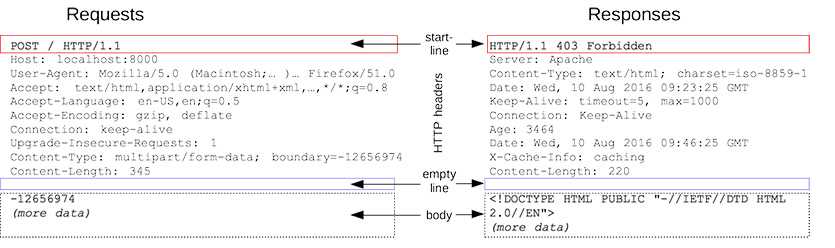
The start-line and HTTP headers of the HTTP message are collectively known as the head of the requests, whereas its payload is known as the body.
Requests
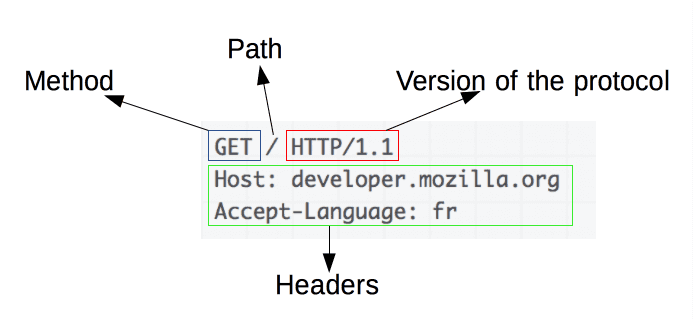
Requests consists of the following elements:
- An HTTP method, usually a verb like
GET,POSTor a noun likeOPTIONSorHEADthat defines the operation the client wants to perform. Typically, a client wants to fetch a resource (usingGET) or post the value of an HTML form (usingPOST), though more operations may be needed in other cases. - The path of the resource to fetch; the URL of the resource stripped from elements that are obvious from the context, for example without the protocol (
http://), the domain (here,developer.mozilla.org), or the TCP [port] (here,80). - The version of the HTTP protocol.
- Optional headers that convey additional information for the servers.
- Or a body, for some methods like
POST, similar to those in responses, which contain the resource sent.
Responses
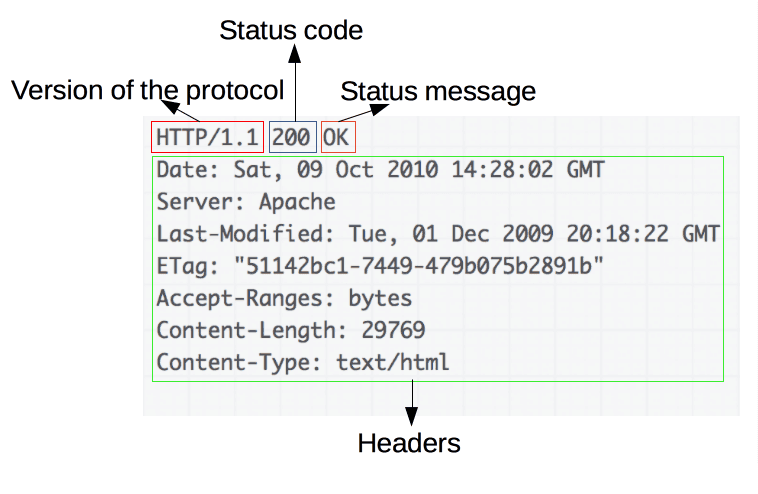
Responses consist of the following elements:
- The version of the HTTP protocol they follow.
- A status code, indicating if the request was successful, or not, and why.
- A status message, a non-authoritative short description of the status code.
- HTTP headers, like those for requests.
- Optionally, a body containing the fetched resource.
4. APIs based on HTTP
The most commonly used API based on HTTP is the XMLHttpRequest API, which can be used to exchange data between a user agent and a server. The modern Fetch API provides the same features with a more powerful and flexible feature set.
5. HTTP request methods
HTTP defines a set of request methods to indicate the desired action to be performed for a given resource. Although they can also be nouns, these request methods are sometimes referred to as HTTP verbs.
GET: TheGETmethod requests a representation of the specified resource. Requests usingGETshould only retrieve data.POST: ThePOSTmethod is used to submit an entity to the specified resource.PUT: ThePUTmethod replaces all current representations of the target resource with the request payload.DELETE: TheDELETEmethod deletes the specified resource.OPTIONS: TheOPTIONSmethod is used to describe the communication options for the target resource.PATCH: ThePATCHmethod is used to apply partial modifications to a resource.
6. HTTP response status codes
HTTP response status codes indicate whether a specific HTTP request has been successfully completed. Responses are grouped in five classes:
- Informational responses (
100–199) - Successful responses (
200–299) - Redirects (
300–399) - Client errors (
400–499) - and Server errors (
500–599)
AJAX
What’s AJAX?
AJAX stands for Asynchronous JavaScript And XML. In a nutshell, it is the use of the XMLHttpRequest object to communicate with servers. It can send and receive information in various formats, including JSON, XML, HTML, and text files. AJAX’s most appealing characteristic is its "asynchronous" nature, which means it can communicate with the server, exchange data, and update the page without having to refresh the page.
Although X in Ajax stands for XML, JSON is used more than XML nowadays because of its many advantages such as being lighter and a part of JavaScript. Both JSON and XML are used for packaging information in the Ajax model.
- Make requests to the server without reloading the page
- Receive and work with data from the server
Fetch API
The Fetch API provides an interface for fetching resources. The fetch() method takes one mandatory argument, the path to the resource you want to fetch. It returns a Promise that resolves to the Response to that request, whether it is successful or not. The promise does not reject on HTTP errors.
fetch(resource [, init])
resource: This defines the resource that you wish to fetch.
init: An object containing any custom settings that you want to apply to the request. The possible options are: method, headers, body, mode, etc.