프런트엔드 포지션의 체계적인 개발 구조와 흐름을 알고 싶었다. 성장의 지름길 중 하나는 어깨너머로 배우는 것인데 취업 전엔 흔치 않은 기회다. 난 클론 코딩이 이 역할을 대신할 수 있는 좋은 가이드가 되어줄 것으로 기대했다.
팔로잉의 과정은 코드 작성과 블로깅을 병행했는데 딜레마가 있었다. 우선 클론 코딩의 콘텐츠를 가지고 코드를 작성하기 전 개념을 이해하는 시간을 가짐으로써 새로운 기술을 배우는데 적응하는 시간을 줄일 수 있었다. 하지만 주도적인 개발이 아니었기 때문에 내 생각이 끼어들 틈이 없었고 남는 것이 없는 것처럼, 성장하고 있지 않은 것처럼 아쉬움이 느껴졌다. 그래서 뭔가 블로깅에 더 집착했던 것 같은데..
블로깅은 클론 코딩의 흐름을 따라 기록했다. 기록하는 동안 혼란이 있었는데 하나는 당장 사용한 기술의 일부만 정리하다 보니 하나의 기술을 깊게 정리하지 못하고 개념이 분산되는 느낌, 다른 하나는 중복되는 내용이 많아서 모든 흐름을 기록하지 못하는 아쉬움. 그런데 최근 깨달은 것은 지식의 실용성이랄까.. 정말 쓸모 있는 지식을 쌓는 것이 아니면 의미가 없다는 건데, 그런 의미에서 결국 둘 다 최선의 선택이었다. 어쨌든 성장을 위한 좋은 기록의 전제(재료)는 내 생각으로 시작하는 자기 주도적인 개발과 그에 따르는 시행착오라고 생각한다. 역시 뭐든 해봐야 알고 그 과정은 완벽하지 않아도 가치가 있다.
프런트엔드 취업을 위한 포트폴리오에서 사용하고 싶은 기술이 아직 남아서 클론 코딩을 한 번 더 진행할 텐데 이 단계를 어서 넘기고 위 의도에 맞게 많이 생각하고 많은 코드를 치고 싶다. 다음은 TypeScript와 Next.js, GraphQL다. 잘하고 있는지는 모르겠지만 닥치고 그냥 한다.
Testing
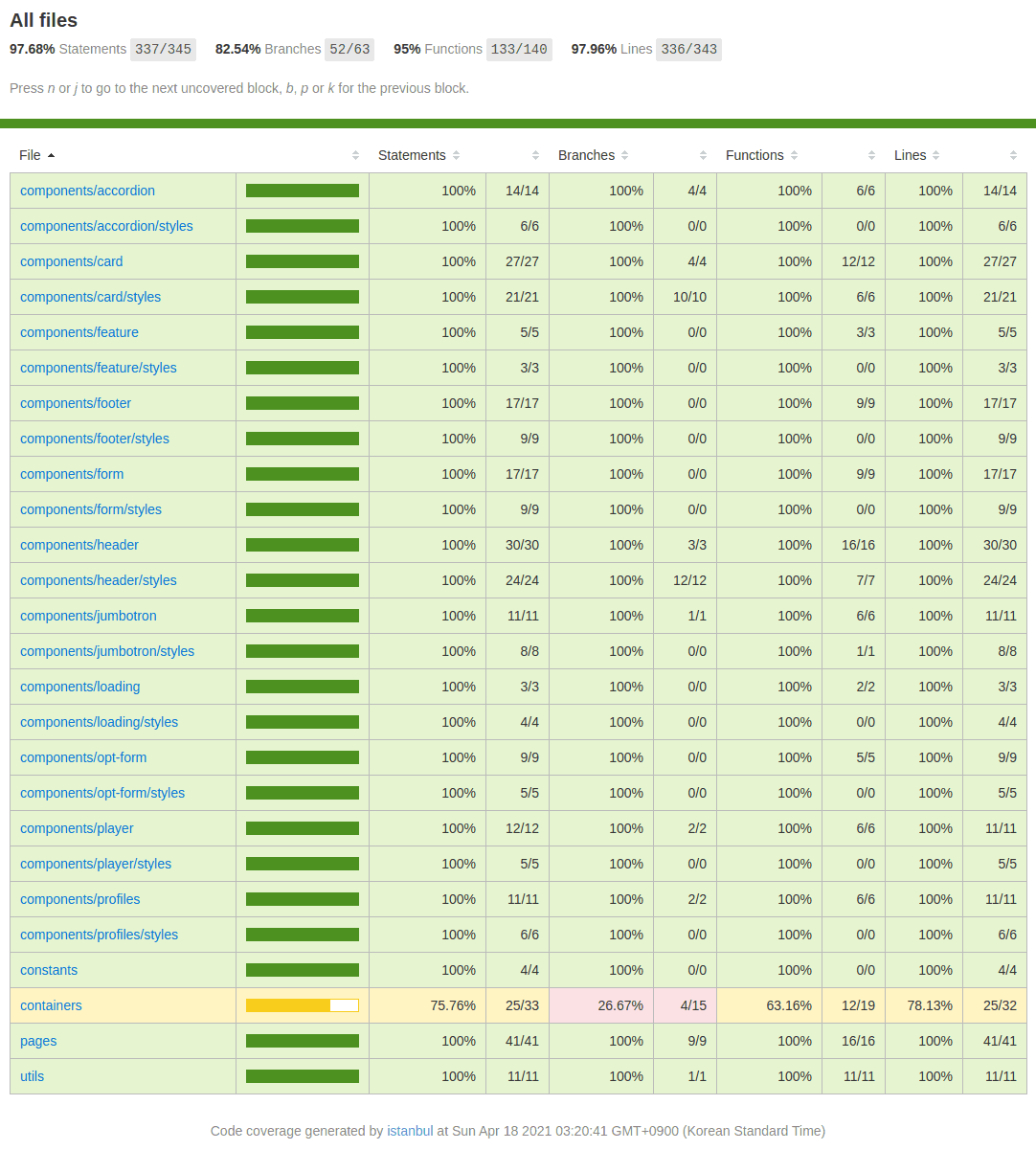
테스트가 끝났다. containers/browse.js 파일 테스트는 100% 클리어하지 못했다. 테스팅 라이브러리에 대한 이해도가 부족하다는 것을 알지만 첫술에 배부를 수 없으니 미련 없이 넘어간다. 시간이 지나 다시 돌아오면 분명 정복할 수 있을 거다.
마지막으로 pages/signup.js 테스트 파일의 자바스크립트 비동기 처리 문법과 JEST의 Mock Functions을 기록하고 마무리 지으려 한다.
#1
jest.mock('react-router-dom', () => ({
  ...jest.requireActual('react-router-dom'),
  useHistory: () => ({})
}))jest.fn()으로 모의 함수를 만들 수 있다. 구현이 되지 않으면 모의 함수가 호출될 때undefined가 반환된다.jest.requireActual(moduleName):react-router-dom모듈의 오리지널 API는 그대로 사용하고useHistory만 따로 모의 구현한다.
#2
const firebase = {
  auth: jest.fn(() => ({
    createUserWithEmailAndPassword: jest.fn(() =>
      Promise.resolve({
        user: {
          updateProfile: jest.fn(() => Promise.resolve('I am signed up!'))
        }
      }))
  }))
}
위 firebase의 모의 함수는 signup 페이지의 아래 코드를 테스트할 때 이용한다.
const HandleSingUp = (event) => {
  event.preventDefault()

  firebase
    .auth()
    .createUserWithEmailAndPassword(emailAdress, password)
    .then(result => {
      result.user.updateProfile({
        displayName: firstName,
        photoURL: Math.floor(Math.random() * 5 + 1)
      })
    })
    .then(() => {...
    })
    .catch(error => {...
    })
}
#3
await fireEvent.change(getByPlaceholderText('First name'), { target: { value: 'Soomin' } })
await fireEvent.change(getByPlaceholderText('Email or phone number'), { target: { value: 'jsmsumin2@naver.com' } })
await fireEvent.change(getByPlaceholderText('Password'), { target: { value: 'password' } })
fireEvent.click(getByTestId('sign-up'))

expect(getByPlaceholderText('First name').value).toBe('Soomin')
expect(getByPlaceholderText('Email or phone number').value).toBe('jsmsumin2@naver.com')
expect(getByPlaceholderText('Password').value).toBe('password')
expect(queryByTestId('error')).toBeFalsy()
비동기 처리 문법을 사용한 테스트에서 에러가 발생했다.
Warning: An update to SignUp inside a test was not wrapped in act(...).
When testing, code that causes React state updates should be wrapped into act(...): act(() => { /* fire events that update state */ }); /* assert on the output */
컴포넌트를 렌더링하고 갱신해 주는 코드를 ReactTestUtils의 act()로 래핑 해주거나 비동기 코드를 처리하기 위한 유틸리티 waitFor를 사용하면 된다.
import React from 'react'
import { BrowserRouter as Router } from 'react-router-dom'
import { FirebaseContext } from '../../context/firebase'
import { SignUp } from '../../pages'
import { render, fireEvent, waitFor } from '@testing-library/react'
// import { act } from 'react-dom/test-utils'

jest.mock('react-router-dom', () => ({
  ...jest.requireActual('react-router-dom'),
  useHistory: () => ({})
}))

describe('<SignUp />', () => {
  it('renders the sign up page with a form submission', async () => {
    const firebase = {
      auth: jest.fn(() => ({
        createUserWithEmailAndPassword: jest.fn(() =>
          Promise.resolve({
            user: {
              updateProfile: jest.fn(() => Promise.resolve('I am signed up!'))
            }
          }))
      }))
    }

    const { getByPlaceholderText, getByTestId, queryByTestId } = render(
      <Router>
        <FirebaseContext.Provider value={{ firebase }}>
          <SignUp />
        </FirebaseContext.Provider>
      </Router>
    )

    await waitFor(async () => {
      await fireEvent.change(getByPlaceholderText('First name'), { target: { value: 'Soomin' } })
      await fireEvent.change(getByPlaceholderText('Email or phone number'), { target: { value: 'jsmsumin2@naver.com' } })
      await fireEvent.change(getByPlaceholderText('Password'), { target: { value: 'password' } })
      fireEvent.click(getByTestId('sign-up'))

      expect(getByPlaceholderText('First name').value).toBe('Soomin')
      expect(getByPlaceholderText('Email or phone number').value).toBe('jsmsumin2@naver.com')
      expect(getByPlaceholderText('Password').value).toBe('password')
      expect(queryByTestId('error')).toBeFalsy()
    })
  })
})